| Game Commander
by Thomas "AV8R" Spann |
||||
|
Every so often a new product comes along that helps the virtual fighter pilot with the cranium meltdown that occurs when trying to deal with the many keyboard game commands in the midst of combat. The advent of fully programmable joystick and throttle controllers were the first major leap in this direction. No longer did you have to take your eyes off the screen and hands off the controllers (like the CH-Products, SunCom, Saitek and Thrustmaster controllers.) Next came the programmable game controller panels (like the MasterPilot and PC-Dash), then the voice communications programs to alleviate the text chat. However, we still find ourselves fumbling through popup wingman menus at those critical moments such as calling out for help or commanding a squadron during an intercept mission. To the rescue: MindMaker's Game Commander.
 THE TECHNOLOGY:
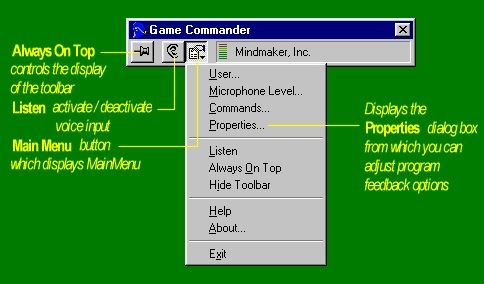
Game Commander is a fully programmable voice command recognition and keyboard mapping application.
What this boils down to is a method for you to bark out orders instead of using your joysticks,
controller panels or keyboard. So for example, instead of manually issuing the keyboard sequence
in Jane's F15E: Wingman Engage
Is this a new concept? No, I used to play with ACES OF THE DEEP :COMMAND in WIN95, and it had a simplistic voice command dictionary. Similarly, Dragon Software is a professional speech recognition application that has been around for a long time, but it is very pricey and is not suited for gaming needs.
What is unique about Game Commander is that it is a voice recognition program that is application specific with gaming in mind. And what genre of gaming is more suited to numerous and complex keyboard commands than our corner of the world?
GETTING STARTED:
Installation was a breeze. Just throw in the CD-ROM and load about 10 MB of program, and use
either
your own microphone or the noise canceling headphone/mic rig that is enclosed. (Ed. Be sure to download the update patch also.) The only gotchas
are to make sure you have a fully duplex sound card and not one that emulates full duplex in
software. Reason being, the emulation process is much slower than if its implemented in
hardware.
|
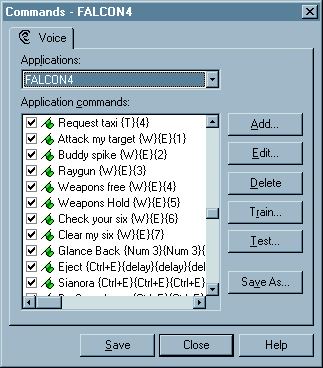
 This emulation process eats up more CPU and imposes a small delay in the processing of the voice commands. So it's best to make sure you use this program with true full duplex emulation for best results. After installation, you invoke GC and you get a small application window with pull down menus. From there you can select the game or Windows application that you want to associate voice commands to application/game keyboard sequences with. GC comes with preconfigured game templates or GCA files: (for flight sims; MS FS, F15E and Falcon4). But the best way to learn this tool was for me to jump in a build my own for Falcon4.0 and Jane's WW2F. If you are familiar with Thrustmaster F22 and M22 programming files, building GCA files is much easier. For you that haven't taken the plunge into the art and science of controller programming, building a GCA template file is a combination of text data entry and voice to command verification. Just by playing with the pre-existing GCA template files, you can easily learn by example and modify an existing file to learn the process. To be frank, it was actually fun (the first time).
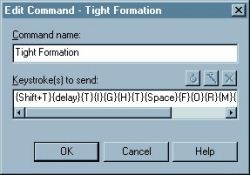 UNDER THE HOOD: For those of you that like to see the nuts and bolts, I have included a snippet of what you see in a GCA template file. The game command is mapped to the game keyboard command or command sequence. With the current patched version, GC can handle up to 3 keys per sequence (like SHIFT+CONTROL+W) and can handle as many repetitions of command sequences as your typing buffer can handle. I have not had a situation where I ran into this repetition limit. There are also options to set the key depress hold down time, and the delay between keystrokes timing. The only programming problems I ran into was the lack of support for Windows native environment command (like ALT+TAB) and some keys that were not recognized (like NUMLOCK /.. this to be addressed in an upcoming release). Once you type in the Command menu fields that map the game command to the keyboard sequences, you can save this into a binary GCA file, and a readable text file. Go to Page Two
|
|||
|
Copyright © 1997 - 2000 COMBATSIM.COM, INC. All Rights Reserved. Last Updated June 10th, 1999 |
||||