Page 2
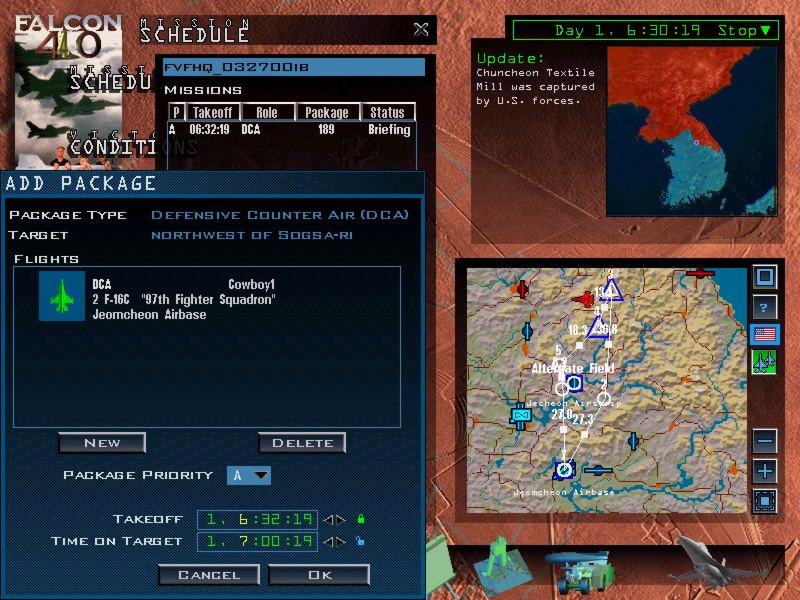
5. Click the "New" button. This will bring up the "Add Flight" UI which then gives you the options to set for the flight. Since you clicked on an airbase, the UI should show "OCA Strike" along with the airbase you selected. In this UI you have other options as well. If you have more than one F-16 squadron, you can then select which squadron you want to use for this mission by clicking in the area next to the words "Squadron" which have the current squadron tasked for the mission. This will bring up a drop down box that shows the other squadrons available in the scenario.
6. Click "Ok" on the "Add Flight" UI. This will close the interface and the mission will then show up in the Add Package UI and on the map. You can then add more flights to this package as you deem necessary by repeating step 4.
7. Click "Ok" on the "Add Package" UI. This will close the Add Package UI and you should then see the mission in the mission scheduler.
Online FlyingCongratulations, you have just made your first scenario mission. The rest is easy from here. To make other missions, just click the targets you want to strike or click an area on the map you want a DCA or BARCAP mission to defend and go through the same steps mentioned above. Now that you have the basics down on how to make missions, the next decision is whether you want to do this offline or online.
While offline play is challenging and exciting, many people want the added enjoyment of flying scenarios with their friends online. For those of you who have followed F4 from release to 1.08i2 patch, you know that F4 has made some progress in online stability. Does this type of play work for flying online with friends? I can answer "yes" but with qualifications. Force on Force Prescripted works with no problems offline, but there are some issues when you bring it to the net. Since I am not part of a LAN squad, I have not been able to test it in that environment, but I have spent many hours testing it over the internet. What follows is how I have been able to achieve success over the net with this type of play.
Having made your first template, or having loaded up a template made by someone else, it's time to find a friend and play online (I am going to assume that you know how to connect online). Once you are connected and in the chat lobby, the host will go into the TE module and select the mission.
In a perfect F4 world, you would have loaded up the scenario and then started making the missions necessary to achieve your victory conditions. In the real F4 world as we currently have it, there are problems when players make missions online. Missions made online do not always show up in the mission scheduler. Where do some of them go? That's a great question. From testing, I have learned that the missions are actually in the sim world, but for some reason the information does not update to the scheduler. If this happened all the time then Force on Force type play would be unplayable online, but I have found a way to work around this problem.
The work around is this. Both players upon first entering into the scenario MUST STOP their clocks before making missions. Once the clocks are stopped, only one person/side at a time may make missions. Let's say you are the host and you have decided to be gracious and let your guest make missions first. What you do is tell the guest to start making his missions and then you sit idle doing nothing till he has finished. Once finished, then the guest is told to sit idle while you make your missions. Remember, all of this is happening with both clocks stopped. I have found that by doing this, there is a 90% success rate in having all the missions show up in the mission scheduler. If you as the host decide that you alone will make all the missions for the scenario, then I found that you can achieve nearly 100% success rate in having missions appear to all players.
Once you both start the clock and allow the scenario to begin, there is no guarantee whatsoever that you will see any more missions that you make appear in the mission schedule. You can attempt to make more missions, but there is no rhyme or reason why some will show up and others will not. Basically, if you decide to make missions while the clock is running, do so at your own risk. Recently I had good success at making additional missions right after all players returned to the UI from flying a mission. When we all returned to the UI I told them to stop their clocks. I then went and made the next round of missions and they all showed up in everyone's mission schedule. Using the method described above, I played a Force on Force prescripted mission with two others online and it worked 100%.
Another interesting aspect for online play is that you and the other player do not have to enter the sim at the same time. It is possible for you to script your missions while online and then have your friend go and fly a mission. It's also then possible for you to join in on another flight and fly a different mission as well. Both of you can go in and out of the sim as necessary. I will again remind that if you stay in the UI while another goes into the sim, the temptation will be to make more missions, but there again you will run into the bug about missions not showing up in the scheduler. It's a use at your own risk issue. I also need to remind you that F4 is not 100% bug free and at times you still can experience crashes when one player is in the sim and the other in the UI, but most of the time it works as advertised. I do hope that as more people play like this, the knowledge base will continue to grow on what works well and doesn't work well.
Now that you have learned these basics, what's left are some comments on tips and strategy.
In my experience and playing, I have found that the key to having fun scenarios is to consider certain aspects carefully while designing the template. Here are my suggestions:
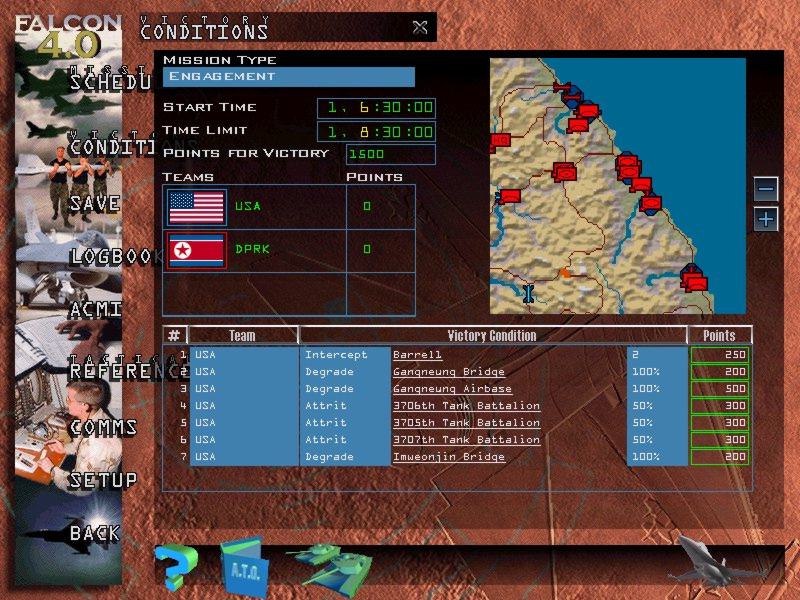
1. Time. Consider the issue of how long you want to play. I've found that most games should normally be structured for one to two hours. This is just enough time to enjoy the scenario while making it possible for online play in one session. Let me explain this more in depth. In setting up a template, you have various options available to you on the victory condition UI.
You can limit the time for the scenario by setting the start and finish times. I've found that one to two hours is a good time period to set for accomplishing victory conditions. What happens when you set the time limit is that at the end time, a victory condition box will show up and display the final score. Of course this only will happen if no one has previously won the scenario by accomplishing the victory conditions.
© 1997 - 2000 COMBATSIM.COM, Inc. All Rights Reserved.