
|
(I/ITSEC) Conference Part II
by Eric Larson, LT USN January 12th, 2000 |
||||
|
Next up was one of the gentlemen from Edwards, a military contractor interested in how the seat performed. He was helped into the straps and took a whirl around the world. Then it was my turn. (By the way, for what it's worth, the pilots who had tried the force-feel seat liked it.) I strapped in (to get the full feel of the seat!) and started the simulation. I had asked to get direction employing the weapons system. The pilot had me roll inverted, pull towards the ground and level out at a lower altitude (about 500 ft), then turn in towards the formation of aircraft. Their position was indicated on the HUD by lines extending radially from the center, the top of the HUD represented forward. Basically, the RWR symbology was being displayed on the HUD. I remembered seeing that in GSC's Hornet3.0... Controls were, again, heavy (seems like I covered this ground before, huh?). Again, controlling the aircraft took up a disproportionate amount of my attention. Finesse was put on the backburner while I listened intently to the direction I was receiving and splitting my concentration on the instrumentation, the terminology the pilot was using and situational awareness. I had to put off the fact that I had the aircraft in a 5-deg climb and I was a little slower than what the pilot had recommended a minute ago... Oh well. I think it would be great if joysticks were made with realistic forces. If we want real, we should be prepared to make control inputs in a realistic fashion. Here's another note on that topic. Aircraft aren't so much controlled with deflection of the stick so much as with *pressure* to the stick. With current hardware the emphasis is on deflection of the joystick. There really is no feedback. Trust me, its a different ball game when you're using the proper hardware. Flying these sims gave me a much greater appreciation for the athletic ability and skill required to operate these aircraft a) safely and b) in a manner that utilizes their full tactical capabilities. As I was flying toward the gaggle of "soon-to-be-debris," I started taking mental note of my surroundings. The HUD is filled with a lot more than the standard commerical sim fare. For example, if you've lost radar lock on a contact, the TD box changes from solid lines to broken lines. Hadn't seen that in civ-sims before. Most of the symbology was familiar to me, but there was more information down and to the left and right that I was unfamiliar with. |
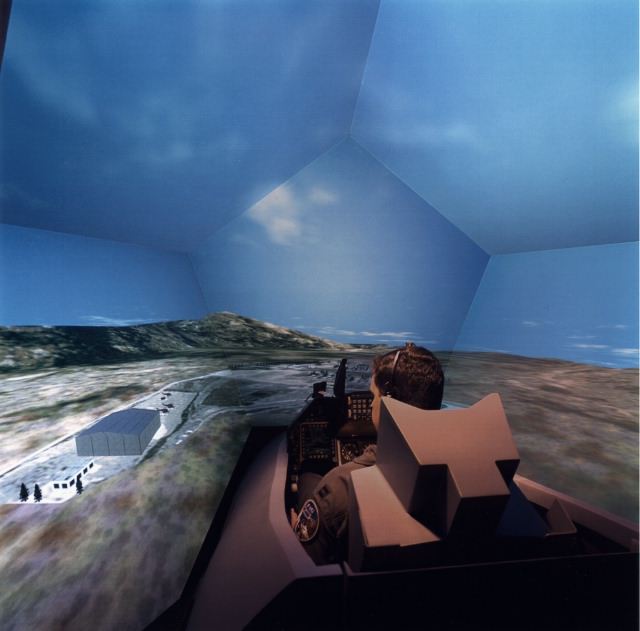 Raytheon Simusphere There were also a lot of tones and voice warnings (even, believe it or not, a whistle! Just like someone was whistling at you to get your attention) that don't normally appear in current civilian PC flight sims. For example, when you command a missile launch, there is a tone, a pause, and *then* a missile fires. In the sims we buy, a missile just flies off the rail - no tones or pauses. I remember my "instructor/guide" would be calling out information and I'd ask, "Where did you see that?" and he would point it out on the HUD or instrumentation. I have to say, the Hornet is much more robust than the F-16 with respect to the amount of information available to the pilot. Another HUD note - the HUD symbology was *very* thin compared to what I'm used to in civilian flight sims. And the symbology appeared larger, too, notably the velocity vector/flight path marker. It was big and round. Imagine a quarter held at arms length - that's about the size of it. In commercial flight sims I would compare the size of the VV with a printed "o" like you see in this article. Keeping track of what HOTAS buttons did what was a challenge. The castle switch controls which MPD is the current SOI. But once the SOI has been changed, the castle switch now can mean something else. For example, deflecting it to the right made the right MPD, currently displaying radar information, the active sensor. A second right-selection automatically locked up a target. Cool. Wouldn't it be great if current sims would incorporate that functionality? Go to Page Three.
|
|||
|
Copyright © 1997 - 2000 COMBATSIM.COM, INC. All Rights Reserved. Last Updated January 10th, 1999 |
||||